10 Business Processes Small Businesses Should Stop Managing Manually

When you launch a business, managing every operational detail by hand feels practical. You manually type client invoices into Word, copy-paste sales figures across weekly spreadsheet tabs, and send individual follow-up emails from your personal inbox.
However, as order volume and client numbers grow, manual tasks stop being an agile advantage and become operational bottlenecks. Every hour spent manually retyping data or chasing unpaid accounts is an hour taken away from business development and client delivery.
Learning which business processes to automate for small business operations allows you to eliminate human error, speed up cash collection, and build reliable backend systems using affordable tools and guidance from authorities like the U.S. Small Business Administration (SBA) on modern business management.
Table of Contents
The Hidden Cost of “Scrappy” Manual Workflows
Manual workflows do not simply consume time; they introduce hidden operational friction:
- Data Entry Fragmentation: Copying numbers from payment processors into spreadsheets creates mismatched records and formula breakages.
- Delayed Cash Flow: Manually generating invoices at the end of the month delays payment cycles by an average of 15 to 30 days.
- Lead Leakage: Delaying email responses to prospective clients while manually updating a tracker drastically lowers conversion rates.
- Key-Person Dependency: When critical operational steps live only inside one person’s head, the business stalls whenever that person takes time off.
10 Critical Business Processes to Automate for Small Business
The 10 Manual Bottlenecks:
- 1. Invoice & Payment Chasing: Manually tracking overdue accounts and sending payment reminders.
- 2. CSV & Data Re-Entry: Copy-pasting raw transaction files between bank feeds and spreadsheets.
- 3. Lead Capture & Routing: Manually moving contact forms and inquiries into tracking sheets.
- 4. Appointment Scheduling: Back-and-forth emails to coordinate client meetings.
- 5. Receipt & Expense Logging: Manually inputting paper or digital receipts line by line.
- 6. Client Onboarding Workflows: Manually sending welcome packets, questionnaires, and account setups.
- 7. KPI Dashboard Compilations: Stitching multiple monthly tabs and files together before review meetings.
- 8. Inventory & Reorder Alerts: Manually checking stock thresholds instead of automated triggers.
- 9. Document & Contract Signing: Printing, scanning, or managing agreements via manual email chains.
- 10. Customer Feedback & Review Intake: Manually following up with clients for testimonials and ratings.
1. Manual Invoice Generation and Payment Follow-Ups
- The Manual Bottleneck: Creating PDF invoices manually in Word or Excel, attaching them to individual emails, and scrolling bank statements to see who paid.
- The Risk: Late payments, missed billing cycles, and awkward manual payment reminder emails.
- The Automated Fix:
- Use accounting platforms (QuickBooks Online, Xero, Wave, or FreshBooks) to generate recurring invoices automatically.
- Enable automated multi-step payment reminders scheduled for 3 days before due date, on the due date, and 7 days overdue.
- Integrate Stripe or automated ACH payments directly onto the invoice link so payments reconcile against invoices automatically.
2. Cross-Platform Spreadsheet Data Entry and CSV Stitching
- The Manual Bottleneck: Exporting CSV files every Friday from Shopify, Stripe, or your CRM, then copying and pasting those rows into a master spreadsheet.
- The Risk: Corrupted formulas, duplicated records, trailing whitespace errors, and wasted administrative hours.
- The Automated Fix:
- Connect your data sources directly to Google Sheets or Excel via API connectors (such as Coupler.io, Make, or Zapier).
- Use Excel Power Query to set up a scheduled data refresh that imports, cleans, and formats incoming raw transaction files automatically with a single click.
[Stripe / Shopify / Webhooks] ──► [Zapier / Power Query] ──► [Master Tabular Sheet]
3. Lead Capture, Routing, and Initial Outreach
- The Manual Bottleneck: Receiving website contact form submissions via standard email notifications, reading them hours later, manually creating a deal record in a tracker, and typing a reply.
- The Risk: Cold leads. Research shows that responding to inbound inquiries within minutes substantially increases pipeline qualification.
- The Automated Fix:
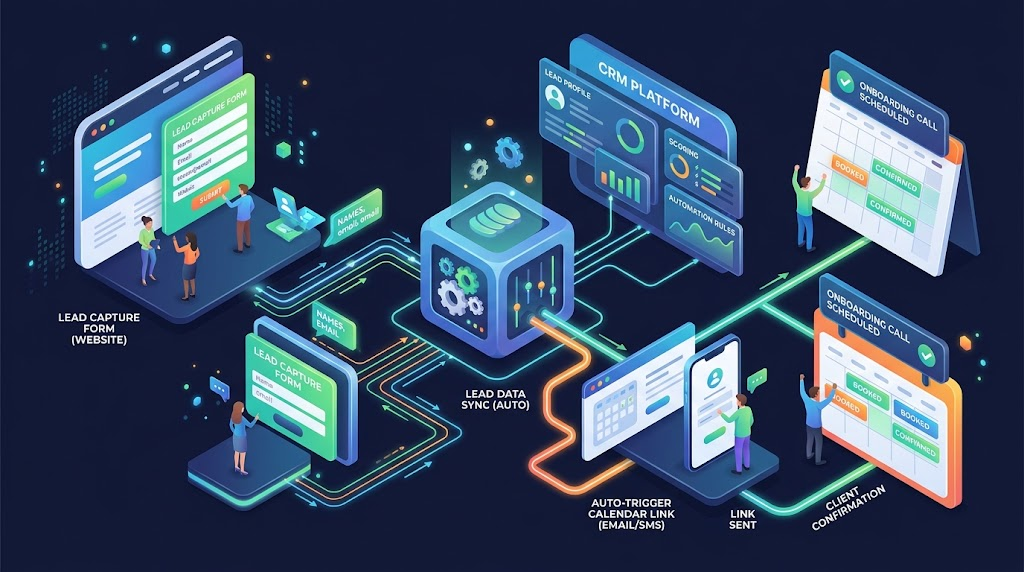
- Connect your web form directly to your CRM (HubSpot Free, Pipedrive, or Airtable) using automated webhooks.
- Trigger an instant, personalized email confirmation confirming receipt and providing a direct booking link.
- Send an automated internal notification to your team’s Slack or Microsoft Teams channel with the prospect’s submission details.
4. Client Appointment Booking and Meeting Reminders
- The Manual Bottleneck: Sending 4 to 6 back-and-forth emails negotiating open meeting slots (“Does Tuesday at 2 PM work for you?”).
- The Risk: Double bookings, lost sales momentum, and high no-show rates.
- The Automated Fix:
- Implement an online scheduling tool (Calendly, Cal.com, or TidyCal) synced directly with your Google or Outlook Calendar.
- Configure automated SMS and email reminders sent 24 hours and 1 hour prior to scheduled calls with dynamic Zoom/Google Meet links attached.
5. Expense Tracking and Receipt Reconciliation
- The Manual Bottleneck: Stuffing paper receipts into envelopes or saving digital invoice PDFs in desktop folders, then manually entering each expense line into an Excel ledger at tax season.
- The Risk: Lost tax deductions, missing paper trail for audits, and inaccurate monthly profit calculations.
- The Automated Fix:
- Use mobile receipt scanning applications (Dext, Hubdoc, or QuickBooks Mobile) that leverage Optical Character Recognition (OCR) to extract dates, vendors, tax, and amounts automatically.
- Establish direct bank and credit card feeds to categorize recurring expenses automatically using pre-set rules.
6. Customer and Client Onboarding Workflows
- The Manual Bottleneck: Manually emailing new clients a list of required documents, re-requesting missing files, creating shared folders by hand, and manually adding contacts to email newsletters.
- The Risk: Delayed project kickoff times, inconsistent client experience, and forgotten administrative steps.
- The Automated Fix:
- Build a standardized onboarding automation trigger inside Make or Zapier:
Trigger: Contract Signed (PandaDoc / DocuSign)
- Step 1: Create a dedicated Google Drive or OneDrive client folder.
- Step 2: Generate a project management board from your template (ClickUp, Asana, or Trello).
- Step 3: Send an automated welcome email containing your client intake form link.
- Step 4: Add the client’s email address to your automated transactional onboarding campaign.
Read Also: How to Use Excel to Manage a Small Business (The Complete Guide)
7. Weekly and Monthly KPI Reporting
- The Manual Bottleneck: Spending 3 hours every Monday morning manually pulling metrics from Google Analytics, advertising dashboards, and sales sheets to build executive reports.
- The Risk: Reporting delays, calculation errors, and decision-making based on stale numbers.
- The Automated Fix:
- Migrate static report sheets to dynamic business intelligence tools (Microsoft Power BI or Looker Studio).
- Structure underlying spreadsheet tables using standard flat tabular formats (single-row headers, strict data types) so aggregate dashboards refresh automatically on schedule.
8. Inventory Tracking and Low-Stock Reorder Triggers
- The Manual Bottleneck: Physically counting stock on shelves or manually auditing rows in a shared Google Sheet to determine when to place purchase orders.
- The Risk: Sudden stockouts on top-selling items or tying up cash flow in slow-moving inventory.
- The Automated Fix:
- Implement automated inventory management software that updates available inventory counts across all sales channels in real time.
- Set up automated conditional alerts (via automated email or Slack notifications) whenever product stock levels drop below designated reorder points.
9. Contract Signing and Document Approvals
- The Manual Bottleneck: Printing agreements, signing them physically, scanning them back to PDF, emailing them as attachments, and manually reminding signers.
- The Risk: Multi-week closing delays, lost agreements, and poor security compliance.
- The Automated Fix:
- Adopt dedicated e-signature tools (DocuSign, PandaDoc, or SignWell).
- Enable automatic signing sequence routing and automated follow-up reminders every 48 hours until all required signature fields are completed.
You May Also Like: 7 Signs Your Small Business Has Outgrown Its Spreadsheets
10. Review Requests and Customer Feedback Collection
- The Manual Bottleneck: Remembering to manually email customers weeks after a purchase or completed project to ask for a Google or Trustpilot review.
- The Risk: Low review volume, giving competitors an advantage in local search rankings and social proof.
- The Automated Fix:
- Trigger an automated review request email or SMS 3 to 7 days after an e-commerce order is marked “Delivered” or a service project is marked “Completed” in your CRM.
- Direct satisfied customers directly to your Google Business Profile review link.
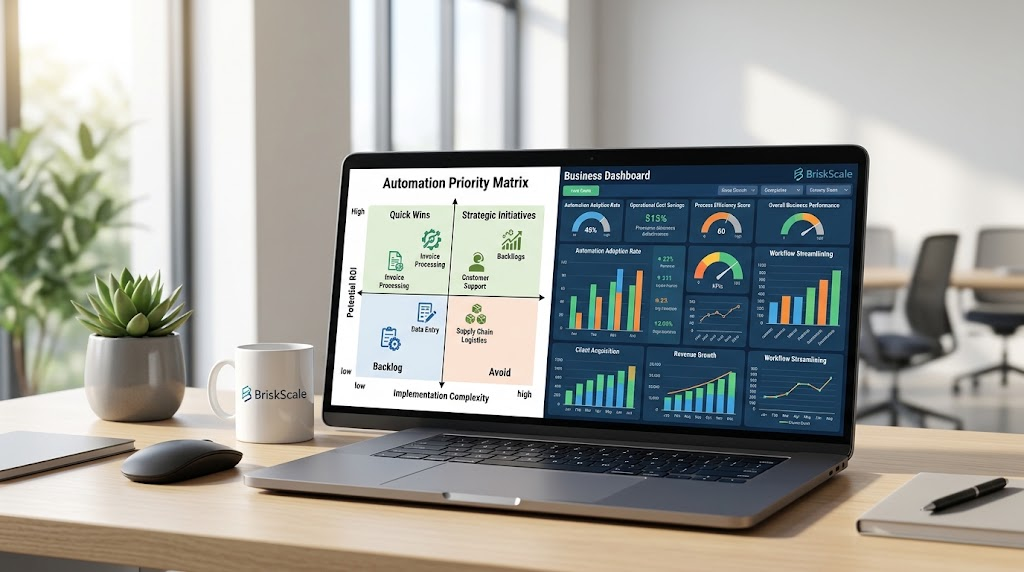
The Small Business Automation Priority Matrix
Do not try to automate all ten workflows simultaneously. Use this priority matrix to identify where to begin based on implementation effort and business impact:
| Business Process | Implementation Effort | Operational Impact | Recommended Starter Tool |
| Invoicing & Reminders | Low | High (Direct Cash Impact) | QuickBooks / Xero / Wave |
| Appointment Booking | Low | High (Saves 3–5 hrs/week) | Calendly / Cal.com |
| Lead Routing & Notifications | Low to Medium | High (Increases Conversions) | Zapier + CRM |
| Receipt Scanning | Low | Medium (Tax Compliance) | Dext / QuickBooks Mobile |
| Document Signing | Low | Medium (Faster Sales Cycles) | SignWell / PandaDoc |
| Spreadsheet CSV Syncing | Medium | High (Data Accuracy) | Power Query / Coupler.io |
| Client Onboarding Sequences | Medium | High (Client Retention) | Make / Zapier |
| Automated KPI Dashboards | Medium to High | High (Executive Visibility) | Power BI / Looker Studio |
| Review & Feedback Requests | Low | Medium (Local SEO & Proof) | CRM / Email Automation |
| Inventory Reorder Alerts | Medium to High | High (Working Capital) | Katana / Unleashed |
3 Rules for Automating Without Breaking Your Operations
- Never Automate a Broken Process: Automation accelerates existing systems. If your onboarding process is confusing or poorly defined on paper, automating it will only deliver a confusing experience to your clients faster. Document the manual steps clearly before building triggers.
- Establish a Single Source of Truth: Avoid having customer contact info updated in three different disconnected tools. Designate one platform (typically your CRM or master ledger) as the primary database.
- Build Error-Catching Alerts: Whenever you create automated workflows across platforms (via Zapier, Make, or API scripts), configure email notifications for failed runs so you can fix broken connections immediately.
Read Also: 10 Excel Mistakes That Can Ruin Small Business Reports (And How to Fix Them)
Frequently Asked Questions
What is the easiest business process to automate first?
Appointment scheduling and invoice payment reminders are the fastest workflows to automate. Both take less than 30 minutes to configure using tools like Calendly and your current invoicing software, providing immediate time savings without requiring complex technical integration.
Do I need to know how to code to automate small business workflows?
No. Modern no-code platforms like Zapier, Make, and built-in software integrations allow you to build automated multi-step workflows using visual drag-and-drop builders and pre-built templates.
When should a small business keep a process manual?
High-touch, high-stakes interactions—such as resolving an unhappy customer’s complaint, conducting high-ticket sales negotiations, or conducting strategic team reviews—should remain personal and manual. Automate repetitive backend administration so you have more time for those critical human conversations.